Create the Patient Report
The Patient Report is a printable PDF document which shows the results of a completed COGNISIONTM qEEG/ERP test.
NOTE: To create a Patient Report, the user must have "Patient Report" User Rights
NOTE: Adobe Reader must be installed on the computer to launch the Report
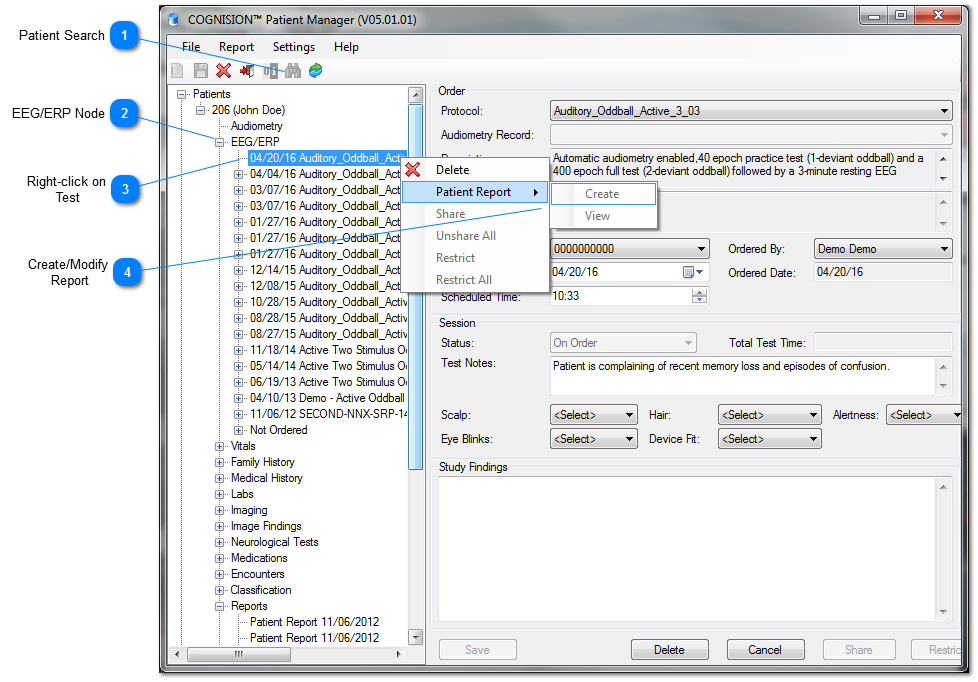
 Patient Search
-
Launch Patient Manager and click
 to search for desired patient
 -
Leave all fields blank to display all registered patients
-
Or enter the Patient ID or name to search specific patient
 EEG/ERP Node
Once the Patient is located, expand the Patient Node to access the EEG/ERP test data.
 Right-click on Test
Right-click on desired test to access Patient Report options.
CAUTION: Choosing Delete will delete the chosen test record and will require confirmation.
 Create/Modify Report
Choose Create to initiate a Report
When creating a new report, a billable event will occur

Choose Yes to continue creating report
Once created, the report will automatically be displayed in a separate browser window
NOTE: Creating a report may take up to 3 minutes