Headset Control Unit (HCU)

The Headset control Unit or HCU is the brain behind the COGNISION™ Headset System. This handheld, battery-powered device is held by the test subject while the EEG/ERP test is being performed.
The HCU performs three primary functions:
-
initiates the EEG/ERP test
-
displays status and test information
-
captures subject responses using the action buttons
NOTE: The HCU contains a 3.7V rechargeable LiPoly battery. This battery is not field replaceable. If the device has difficulty charging, or maintaining a charge, contact customer service to request product servicing.
User Controls


Special Functions
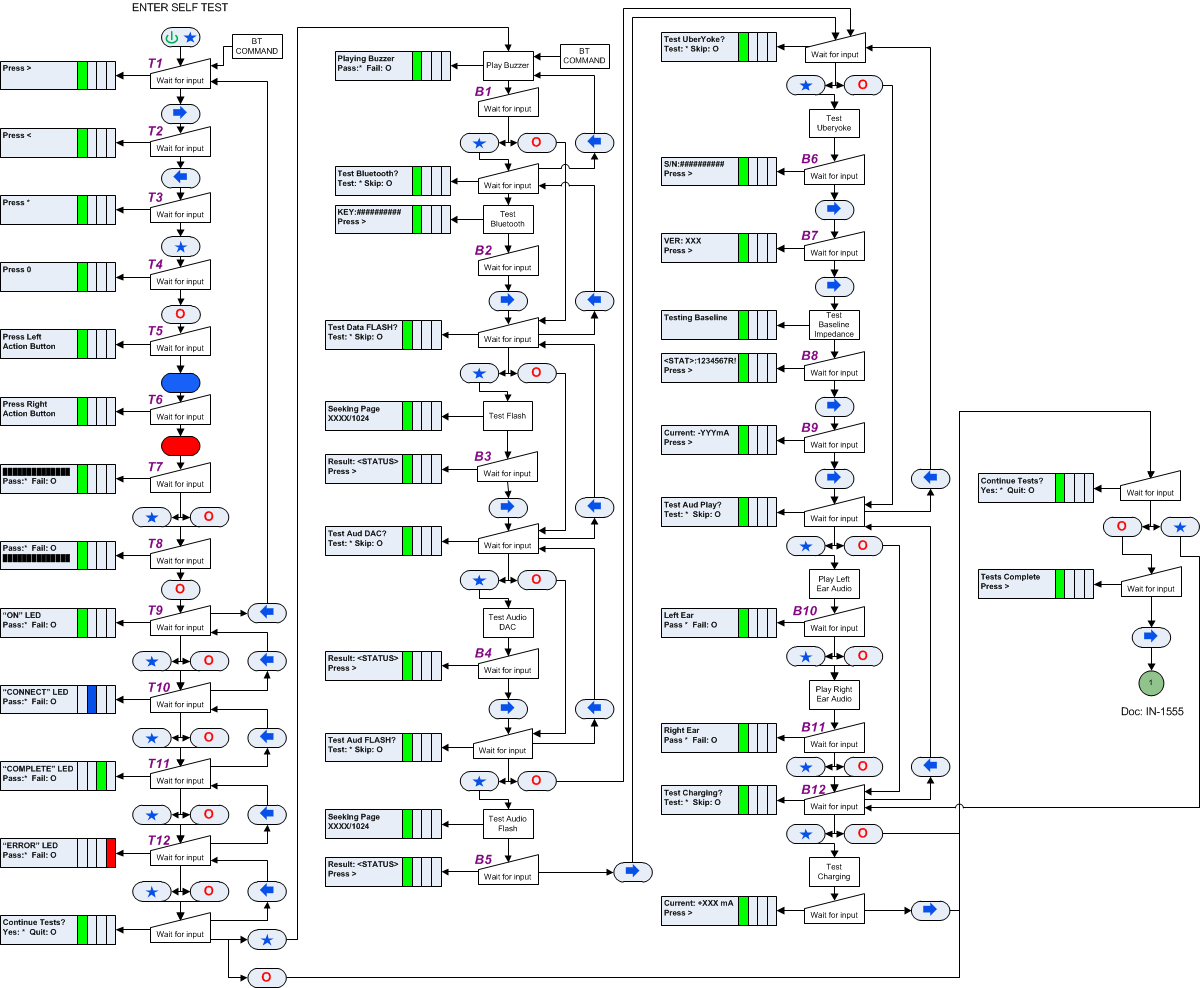
Power Up and Self Test
-
To run the Self Test, press
 +
+ 
-
Follow the sequence below to test each subsystem:
Errors
A number of errors or problems may occur during the test. See the flowchart below to learn how to correct or recover from the most common errors:

Reset
NOTE: A reset should only be performed upon guidance from Customer Support. This will return the HCU to a normal start up state. All tests and test data will be lost.
From any state except Upload Data, a soft reset can be performed. To do so, press and hold for 3 seconds 0 + *.
