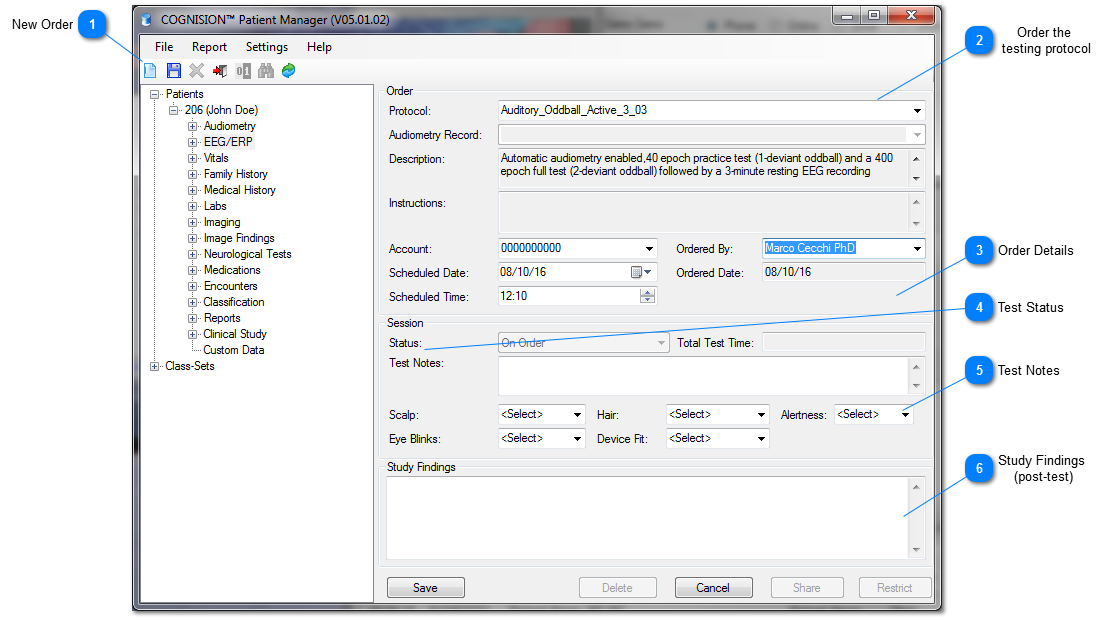
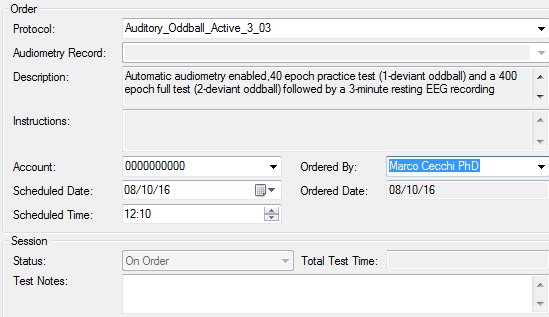
EEG/ERP tests are ordered ahead of time and all of the test parameters are selected at this time.
 New Order After selecting the EEG/ERP node and pressing the new order tool a new EEG/ERP test can be ordered.
|
 Order the testing protocol
|
Protocol
|
Specific pre-defined testing protocol to be performed with this patient
|
|
Status
|
Status of the order
|
|
Audiometry Record
|
If hearing thresholds are to be used to adjust stimulus volume
|
|
Description
|
General description of the test
|
|
Scheduled Date
|
Date when this test should be performed
|
|
Time
|
Time when this test should be performed
|
|
Date Ordered
|
Date when the test was ordered
|
|
Account
|
Account who is scheduled to perform the test
|
|
Ordered by
|
The name chosen in Ordered By will reflect as the Treating Physician's name in the Patient Report
|
|
Notes
|
Test notes
|
|
 Order Details
After choosing a testing protocol, you may select order details:
|
Account
|
Select your account number from the dropdown menu
|
|
Scheduled Date & Time
|
Select scheduled date and time of the test session
|
|
Ordered By
|
Select the treating physician's name
|
NOTE: The name chosen in Ordered By will reflect as the Treating Physician's name in the Patient Report.
|
 Test Status A qEEG/ERP test has 3 status options:
Status: On Order, In Progress, Finished
|
 Test Notes After the testing session, Test Notes may be entered which will later display in this field as part of the test session record and on the patient report.
|
 Study Findings (post-test) After the testing session, Study Findings may be entered which will display on the patient report.
|
|